


SharePoint is a collaborative platform from Microsoft primarily designed for document management and storage. It offers Intranet services, document storage capabilities, and robust collaboration features. SharePoint certifications are available through the Microsoft Certified Solutions Expert (MCSE) and Microsoft Certified Solutions Developer (MCSD) programs.
Our official Microsoft SharePoint courses provide comprehensive knowledge and skills for effectively administering and developing this widely used platform. Participants can receive training from Microsoft Certified Trainers and an Authorized Microsoft Learning Partner in Georgia. Both online and onsite, instructor-led live SharePoint training courses are available in Georgia, ensuring that participants gain the necessary expertise to enhance productivity and efficiency for government operations.
Atlanta, GA – Regus at Colony Squar
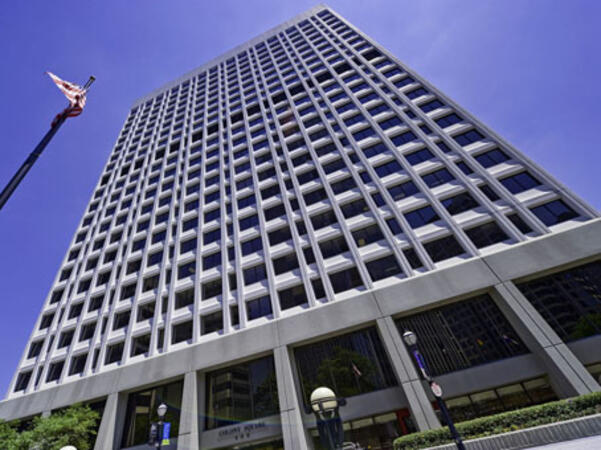
1201 Peachtree Street NE, Suite 200, Atlanta, United States, 30361
The venue is centrally located in Midtown Atlanta within the prominent Colony Square complex at 1201 Peachtree Street NE, easily accessed by car via I‑75/85 or GA‑400, with several parking garages nearby. From Hartsfield–Jackson Atlanta International Airport (ATL), around 15 miles south, a taxi or rideshare typically takes 20–30 minutes north along I‑75/85 N. Public transit users can take MARTA Rail to the Arts Center or Midtown stations (0.3–0.5 miles away) and walk easily, and numerous MARTA bus routes along Peachtree Street stop directly outside the entrance.

Atlanta, GA – The Proscenium
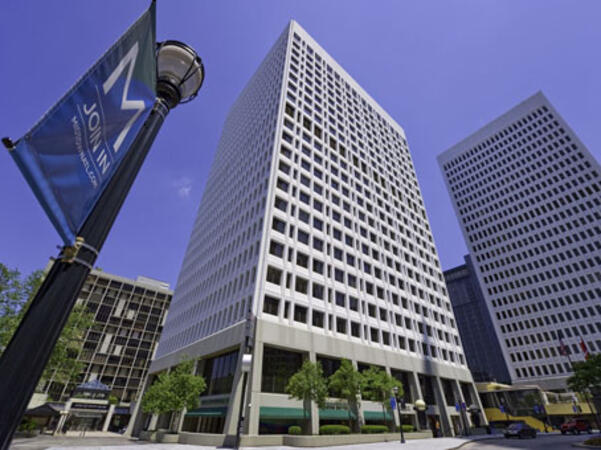
1170 Peachtree Street NE, Atlanta, United States, 30309
The venue is located in the heart of Midtown Atlanta in the Proscenium high–rise at 1170 Peachtree Street NE, easily accessible by car via I‑75/85 and GA‑400 with several parking garages nearby. Visitors arriving from Hartsfield–Jackson Atlanta International Airport (ATL), about 15 miles south, can expect a taxi or rideshare ride taking 20–30 minutes via I‑75/85 North. Public transit is seamless with MARTA Rail service; the Arts Center and Midtown stations are within walking distance (approximately 0.3–0.4 miles), and multiple MARTA bus routes also serve Peachtree Street.
Decatur, GA – Regus at One West Court Square
One West Court Square, Suite 750, Decatur, United States, 30030
The venue is located in the heart of downtown Decatur within One West Court Square, easily reached by car via I‑20 and I‑285, with several public parking decks directly adjacent. Travelers from Hartsfield–Jackson Atlanta International Airport (ATL), approximately 17 miles southwest, can expect a taxi or rideshare ride of around 25–30 minutes via I‑20 East. Public transit is particularly convenient: MARTA rail users can disembark at Decatur Station (about 0.15 miles away) and walk a few minutes to the building entrance. Local bus routes also serve Trinity Place and Swanton Way, putting the center within easy reach.
Atlanta, GA – Regus at One Hartsfield
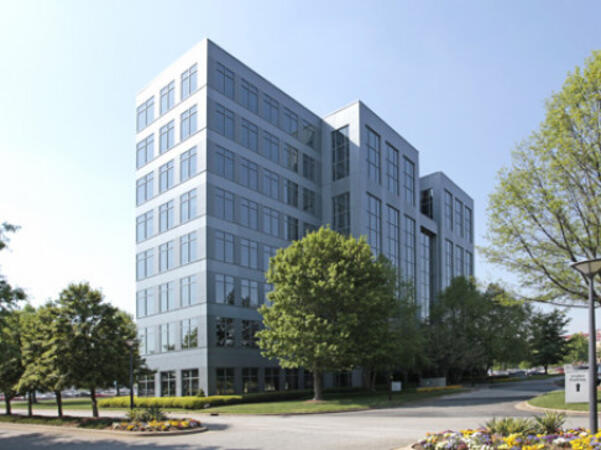
100 Hartsfield Centre Parkway, Suite 500, Atlanta, United States, 30354
The venue is located in the One Hartsfield Center office building, adjacent to Hartsfield–Jackson Atlanta International Airport, easily reached by car via I‑75/I‑85 or GA‑138, with abundant on-site parking. Visitors arriving from ATL airport can walk or take a shuttle to the building, or opt for a quick 2–3‑minute taxi or rideshare ride. Public transit users can board MARTA from the Airport Station and ride one stop to College Park Station, then catch a connecting shuttle or enjoy a brief walk of about half a mile.
Atlanta, GA – Regus at Peachtree
260 Peachtree Street NW, Suite 2200, Atlanta, United States, 30303
The venue is situated in the iconic Coastal States Building at 260 Peachtree Street in downtown Atlanta, accessible by car via I‑75/85 or I‑20 with convenient parking garages nearby. From Hartsfield–Jackson Atlanta International Airport (ATL), about 12 miles south, a taxi or rideshare along I‑75/85 North takes approximately 15–20 minutes. For public transit, MARTA rail users can disembark at Five Points Station and walk 0.5 miles northeast, or exit at Peachtree Center Station and walk two blocks north—both routes offering easy access.
Augusta, GA – At Broad Street
823 Broad Street, Augusta, United States, 3090
The venue is located in the heart of downtown Augusta on Broad Street, easily accessible by car via I‑20 with several public parking garages nearby. From Augusta Regional Airport (AGS), about 9 miles west, taxis or rideshares typically take 15–20 minutes via I‑20. Public transit is available through Augusta Public Transit buses with routes along Broad Street, stopping within a few blocks of the venue, offering a convenient option for attendees without a car.
Savannah, GA – Regus at Bull Street
100 Bull St Downtown, Suite 200, Savannah, United States, 31401
The venue is located in the historic downtown area on Bull Street in the Altmayer Building, easily accessible by car via I‑16 and U.S. 17, with several public garages nearby. From Savannah/Hilton Head International Airport (SAV), about 12 miles west, taxis or rideshares typically take 15–20 minutes via U.S. 17 South. Public transit is available via Chatham Area Transit (CAT) buses, with frequent service along Bull and Broughton Streets; Johnson Square Station is just a couple minutes’ walk from the venue.
This instructor-led, live training (available online or onsite) is designed for intermediate-level supervisors and programming officers who seek to deepen their understanding of administering SharePoint and effectively leveraging Microsoft 365 Copilot for government use.
By the end of this training, participants will be able to:
- Comprehend the foundational architecture and administration principles of SharePoint.
- Configure and manage SharePoint sites and user permissions.
- Implement security and compliance measures within SharePoint.
- Integrate and manage Microsoft 365 Copilot features to enhance organizational productivity for government operations.
- Apply best practices for data governance and content management in a public sector context.
This five-day course is designed to equip you with the knowledge and skills necessary to plan and administer a Microsoft SharePoint 2016 environment. The curriculum covers the deployment, administration, and troubleshooting of your SharePoint environment. Additionally, it provides guidelines, best practices, and considerations that will help optimize your SharePoint deployment for government use.
This course is the first in a series of two courses tailored for IT professionals and aligns with the SharePoint 2016 IT Pro certification.
Audience Profile
The course targets experienced IT professionals interested in learning how to install, configure, deploy, and manage SharePoint 2016 installations, whether in a data center or in the cloud. Participants typically have more than one year of hands-on experience with planning and maintaining SharePoint environments and at least two years of experience with core technologies that SharePoint depends on, such as Windows Server 2012 R2 or later, Internet Information Services (IIS), Microsoft SQL Server 2014 or later, Active Directory Domain Services (AD DS), and networking infrastructure services.
The minimally qualified candidate typically:
Is an IT professional responsible for planning, implementing, and maintaining a multi-server deployment of SharePoint 2016.
Possesses practical knowledge and experience with SharePoint Online.
Has broad familiarity with SharePoint workloads.
Has expertise in business continuity management, including data backup, restoration, and high availability.
Is familiar with authentication and security technologies.
Has hands-on experience with Windows PowerShell.
The hands-on or job experience should be from a solutions-based role where the candidate has worked on multiple SharePoint projects involving document management, content management, and search functionalities.
At Course Completion
Describe the key features of SharePoint 2016.
Design an information architecture for a SharePoint 2016 deployment.
Design a logical architecture for a SharePoint 2016 deployment.
Design the physical architecture for a SharePoint 2016 deployment.
Install and configure SharePoint 2016.
Create and configure web applications and site collections.
Plan and configure service applications for a SharePoint 2016 deployment.
Manage users and permissions, and secure content in a SharePoint 2016 deployment.
Configure authentication in a SharePoint 2016 deployment.
Configure platform and farm-level security in a SharePoint 2016 deployment.
Manage information taxonomy in SharePoint web applications and site collections.
Configure and manage user profiles and audiences.
Configure and manage the search experience in SharePoint 2016.
Monitor, maintain, and troubleshoot a SharePoint 2016 deployment.
The business landscape has evolved, with a growing demand for communication solutions that eliminate collaborative barriers. Public sector organizations seek cost-effective and flexible options. To address these needs, many are configuring hybrid environments and transitioning content to the cloud.
In this course, designed for government professionals, you will learn how to deploy and configure SharePoint Server 2019, which is tailored to meet the demands of modern workstyles. You will also gain skills in configuring and managing various SharePoint service applications to prepare for a hybrid deployment. Additionally, you will explore how to plan and implement SharePoint hybrid scenarios that ensure a seamless user experience. Finally, you will learn how to design the content migration process, including the available resources and tools needed for migrating content to SharePoint and OneDrive in Microsoft 365.
The evolving business landscape requires seamless communication and cost-effective, flexible solutions. To meet these needs, organizations are configuring hybrid environments and migrating content to the cloud. In this course, you will learn how to deploy and configure SharePoint Server 2019, tailored to support modern workstyles. You will also gain expertise in configuring and managing various SharePoint service applications to prepare for a hybrid deployment. Additionally, you will learn to plan and implement SharePoint hybrid scenarios that ensure a seamless user experience. Finally, you will master the process of designing content migration and utilizing available resources and tools for migrating content to SharePoint and OneDrive in Microsoft 365, specifically designed for government use.
Audience Profile
This course is tailored for IT professionals who are responsible for deploying and managing on-premises SharePoint environments and are interested in implementing hybrid scenarios and content migration to Microsoft 365.
At Course Completion
After completing this course, students will be able to:
Explain the MinRole feature in SharePoint 2019.
Install and configure SharePoint 2019.
Implement high availability for SharePoint.
Provision a BDC Service Application instance.
Configure the Secure Store Service application.
Set up My Sites in SharePoint 2019.
Identify and describe available SharePoint Hybrid Scenarios.
Outline the requirements for SharePoint hybrid configuration.
Plan a SharePoint Server hybrid deployment.
Develop a content migration plan.
Utilize resources and tools during the migration process.
Assess data to be migrated using the SharePoint Migration Assessment Tool (SMAT).
Migrate content to the cloud using the SharePoint Migration Tool (SPMT).
Migrate content to the cloud using Migration Manager.
This one-day course is designed for government SharePoint team members and end users who need to understand how to utilize the team collaboration, document management, and social features of Microsoft SharePoint 2016. The class includes live inline interactive labs where participants engage with both SharePoint and their peers.
Skills Gained
Navigate SharePoint sites for government.
Manage content in lists and libraries.
Create and edit Alerts.
Collaborate using Tasks lists, Calendars, and Document libraries.
Work with libraries, including uploading, downloading, editing, content approval, check out/in, and versioning.
About this Course
This course provides a comprehensive overview of site ownership in SharePoint Online, presented in an engaging and practical manner. It is designed to build your confidence in planning and creating new sites or managing existing ones within the platform. The goal is to equip you with the skills to make SharePoint Online relevant to your team by leveraging its functionalities for information sharing and collaboration. Throughout the course, you will learn best practices and common pitfalls to avoid as you apply theoretical knowledge through hands-on exercises in SharePoint Online.
Audience Profile
This course is suitable for both novice and experienced SharePoint users who are looking to maximize their use of SharePoint Online for government operations.
At Course Completion
Understand the benefits of using SharePoint in real-world scenarios for government
Create new SharePoint sites to store business information efficiently
Develop pages to share news and content with colleagues
Customize the structure of a site to meet specific organizational needs
Create and manage views, columns, and apps for enhanced functionality
Manage site security to ensure data integrity and compliance
Utilize the Power Platform to customize forms and automate processes
Leverage search capabilities to find business information, from people to documents
This one-day training session is designed for individuals who use SharePoint as power users, serving in roles such as SharePoint site owners and Site Collection administrators for government.
Course Objectives:
- Configure site navigation
- Review site activity reports
- Customize lists and libraries
- Work with site columns and site content types
- Set up check-out/check-in, content approval, and versioning
- Create and modify pages and web part pages
This one-day training session is designed for individuals who use SharePoint as users and wish to gain a deeper understanding of its advanced features. Participants should attend this course if they need to comprehend functions such as team collaboration, document management, and social features in Microsoft SharePoint 2013.
This course is specifically tailored for:
- SharePoint Site Owners and users
Course Objectives:
- Manage sites and site collections
- Add and manage user groups, and configure security settings for sites, lists, folders, and items
- Add and customize web parts
- Configure site options, including themes, titles, descriptions, and icons
This training is aligned with the needs of federal agencies and departments to enhance their digital capabilities and ensure effective information management for government operations.
This instructor-led training course, available both on-site and remotely, is designed for system administrators who wish to install, configure, deploy, and manage SharePoint Server 2019. By the end of this training, participants will be able to: configure SharePoint components and options, plan hardware and software architecture for a SharePoint deployment, build taxonomy structures, and troubleshoot SharePoint environment issues. The course format includes interactive lectures and discussions, extensive exercises and hands-on practice, as well as practical implementation in a live environment. Customization Options: This training is based on the local version of SharePoint 2019 (also known as SharePoint Server 2019). For government agencies requiring customized training for this course, please contact us to schedule.
This instructor-led, live training (online or onsite) is aimed at system administrators who wish to install, configure, deploy, and manage SharePoint Server 2019 for government use.
By the end of this training, participants will be able to:
- Configure SharePoint components and options.
- Plan the hardware and software architecture for a SharePoint deployment.
- Build a taxonomy structure.
- Troubleshoot a SharePoint environment.
**Format of the Course**
- Interactive lecture and discussion.
- Extensive exercises and practice sessions.
- Hands-on implementation in a live-lab environment.
**Course Customization Options**
- This training is based on the on-premise version of SharePoint 2019 (a.k.a. SharePoint Server 2019).
- To request a customized training for government, please contact us to arrange.
In this instructor-led, live training, participants will learn how to configure SharePoint Online as they step through the setup and deployment process for government use.
By the end of this training, participants will be able to:
Understand the architecture of SharePoint Online
Configure components and options within SharePoint Online
Work with Site Collections and storage solutions
Manage user profiles and social features
Set up data connectivity
Create a taxonomy structure
Understand and configure the Search functionality
Configure and deploy a SharePoint app
Audience
SharePoint administrators for government
Format of the course
Part lecture, part discussion, with exercises and extensive hands-on practice
This instructor-led, live training in [location] (online or onsite) is designed for government SharePoint users who wish to utilize SharePoint to share and organize information effectively.
By the end of this training, participants will be able to:
- Enhance team collaboration with SharePoint.
- Create SharePoint sites to streamline information management and sharing within their agency.
- Automate workflows to improve business processes for government operations.
This instructor-led, live training in Georgia (online or onsite) is designed for government system administrators and other IT professionals who wish to design, construct, deploy, and manage a SharePoint site.
By the end of this training, participants will be able to:
- Design, structure, and build a SharePoint site.
- Perform Site Collection Administration tasks, including managing Metadata Term Stores and Retention policies.
This advanced-level course is designed for IT professionals and SharePoint administrators responsible for managing, configuring, and securing SharePoint Online environments within Microsoft 365 for government. Participants will delve into the architecture of SharePoint Online, modern site provisioning, permissions governance, content lifecycle management, and integration with other Microsoft 365 apps such as Teams, Power Automate, and Viva.
The course integrates strategic concepts with practical configuration exercises using the Microsoft 365 admin center, SharePoint Admin Center, and PowerShell. Emphasis is placed on addressing real-world administrative scenarios, automation, compliance, and optimizing user adoption while upholding governance standards for government operations.
This hands-on, practical course provides a comprehensive introduction to Microsoft SharePoint Online, tailored for government agencies looking to enhance collaboration, document management, process automation, and integration within the Microsoft 365 ecosystem. Participants will explore SharePoint’s core capabilities, including document libraries, lists, permissions, and site structures, while also gaining introductory experience with automation tools such as Power Automate and Power Apps. This course is designed to align with public sector workflows, governance, and accountability requirements for government.
Read more...
Last Updated:
Testimonials (2)
It was meant to give us a greater picture and this has been achieved.
Kai - Dutch Ministry of Defence
Course - SharePoint Site Collection Administration
Online SharePoint training in Georgia, SharePoint training courses in Georgia, Weekend SharePoint courses in Georgia, Evening SharePoint training in Georgia, SharePoint instructor-led in Georgia, SharePoint private courses in Georgia, SharePoint boot camp in Georgia, Evening SharePoint courses in Georgia, Weekend SharePoint training in Georgia, SharePoint trainer in Georgia, SharePoint coaching in Georgia, SharePoint one on one training in Georgia, SharePoint instructor in Georgia, SharePoint instructor-led in Georgia, Online SharePoint training in Georgia, SharePoint classes in Georgia, SharePoint on-site in Georgia