Get in Touch

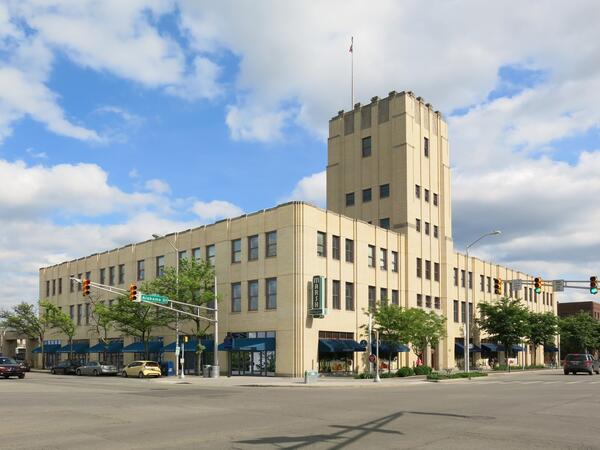
Indianapolis, IN - Lockerbie Marketplace

333 N. Alabama Street Suite 350, Indianapolis, United States, 46204

Regus at Lockerbie Marketplace is centrally located in downtown Indianapolis and easily accessible by car, with public parking available along North Alabama Street and in nearby garages. Visitors flying into Indianapolis International Airport (IND) can reach the venue in approximately 20 to 25 minutes via taxi or rideshare, following I‑70 E and exiting onto New York Street toward downtown. For public transit users, IndyGo routes serving the Massachusetts Avenue and Chatham Arch districts stop within a few blocks, making the location convenient for those traveling from other parts of the city.

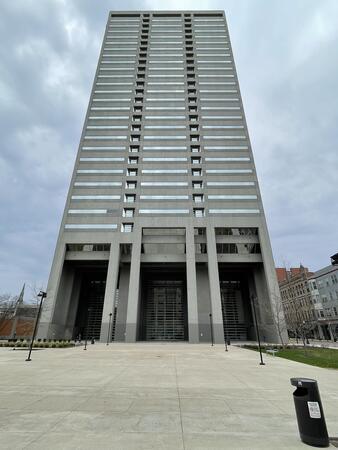
Fort Wayne, IN - Regus – Power Center

110 E Wayne St floor 12, Fort Wayne, United States, 46802

The venue is conveniently located in downtown Fort Wayne, easily accessible by car via Interstate 69 through either the South Clinton Street or Apple Street exits, which lead directly into the Wayne Street corridor. Visitors will find nearby parking garages as well as metered street parking options. For those arriving by air, the venue is approximately 13 miles northeast of Fort Wayne International Airport (FWA), with a taxi or rideshare ride taking about 20 minutes via I‑69 and Jefferson Boulevard. Public transit is also available: Citilink buses serve downtown with stops just a few blocks away from the venue, near the intersection of Wayne and Clinton Streets.

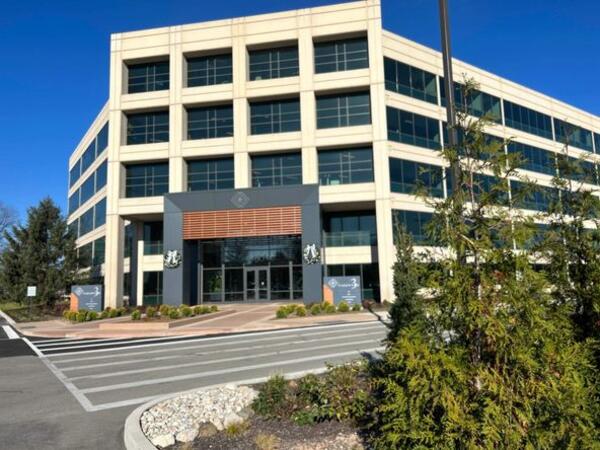
Indianapolis, IN - Regus – Parkwood Crossing Center

450 E 96th St #500, Indianapolis, United States, 46240

This venue is conveniently accessed by car via the I‑465 beltway, exiting north onto Keystone Avenue before turning onto E 96th Street; ample parking is available in the adjacent surface and garage lots. For those arriving by air, the Indianapolis International Airport (IND) is approximately 17 miles away, with taxis or rideshares taking roughly 25–30 minutes via I‑465 and Keystone Avenue. Public transit is available via IndyGo routes 19 and 120, which serve the 96th Street corridor; the bus stop at Parkwood Crossing is only a short walk from the building.

Subcategories (3)

Explore Our Courses

Microsoft 365 for Teams, OneDrive, Planner & Copilot: Productivity and Governance

14 Hours

Microsoft 365: Building Advanced Knowledge Management Systems

14 Hours

Microsoft Intune: Modern Endpoint Management and Security

21 Hours

Microsoft 365 for Leaders: Advanced Productivity and Copilot Integration

30 Hours

Microsoft To Do: Personal Productivity and Team Collaboration

14 Hours

Microsoft To Do Essentials - 1 Day

7 Hours

System Center Data Protection Manager (DPM) Backup and Recovery

35 Hours

Microsoft 365 Productivity Tools: Teams, OneDrive, and Outlook

14 Hours

Microsoft 365 Productivity Tools: Outlook, OneDrive, Teams, Planner, and Forms

14 Hours

Microsoft Exchange Server Administration

35 Hours

Microsoft OneNote for Organization and Collaboration

7 Hours

Microsoft Certified: Azure Data Engineer Associate Exam Preparation (DP-203)

35 Hours

Task Management with Microsoft Planner

7 Hours

Microsoft 365 Essentials: Teams, Word, and Excel

14 Hours

Microsoft Certified: Azure DevOps Engineer Exam Preparation (AZ-400)

35 Hours

Microsoft Certified: Azure Solutions Architect Expert Exam Preparation (AZ-305)

28 Hours

PL-300T00: Microsoft Power BI Data Analyst

21 Hours

Microsoft Certified: Azure Security Engineer Associate Exam Preparation (AZ-500)

35 Hours

System Center Operations Manager (SCOM) Administration and Monitoring

35 Hours

Microsoft 365 Administration and Security Essentials

35 Hours

Microsoft Certified: Azure Developer Associate Exam Preparation (AZ-204)

35 Hours

Microsoft 365 Administration and Security

35 Hours

Microsoft Certified: Azure Administrator Associate Exam Preparation (AZ-104)

28 Hours

Microsoft Certified: Azure Fundamentals Exam Preparation (AZ-900)

14 Hours

Working Efficiently with OneNote

7 Hours

40511-G: Microsoft Cloud Workshop: Continuous delivery in Azure DevOps

7 Hours

Introduction to SQL Databases (10985CC)

21 Hours

Office 365 Administration and Troubleshooting (10997DC)

21 Hours

Planning and Administering SharePoint 2016 (authorized training course MS 20339)

35 Hours

Virtualizing Enterprise Desktops and Apps (20694BC)

35 Hours

Working with spreadsheet in Microsoft Excel

14 Hours

Excel Advanced with VBA

21 Hours

Visual Basic for Applications (VBA) in Excel (intermediate level)

14 Hours

Microsoft Office Excel - working effectively with the spreadsheet

14 Hours

Windows Operating System Fundamentals (40349BC)

21 Hours

AZ-104T00-A: Microsoft Azure Administrator

28 Hours

PL-300: Microsoft Power BI Data Analyst

21 Hours

M20703 - ADMINISTERING SYSTEM CENTER CONFIGURATION MANAGER

35 Hours

INSTALLING AND CONFIGURING SYSTEM CENTER 2012 OPERATIONS MANAGER

35 Hours

MB-300T00: Microsoft Dynamics 365: Core Finance and Operations

14 Hours

MB 500: Microsoft Dynamics 365: Finance and Operations Apps Developer (authorized training course)

35 Hours

Office 365 Administrator (authorized training MS 030)

35 Hours

MS-100T01-A: Office 365 Management

14 Hours

MS-102T00: Microsoft 365 Administrator

35 Hours

Administering Microsoft® SQL Server® 2014 Databases (authorized training course MS 20462)

35 Hours

MS-900T01: Microsoft 365 Fundamentals

7 Hours

Office 365 – your online office

14 Hours

PL-400T00-A: Microsoft Power Platform Developer

35 Hours

Windows Server 2019 Administration (authorized training course WS 011T00)

35 Hours

Windows Server 2019 Hybrid and Azure IaaS (authorized training course WS 012T00)

21 Hours

DP-080T00: Querying Data with Microsoft Transact-SQL

14 Hours

Last Updated:

Testimonials (6)

Upcoming Courses

Online Microsoft training in Indiana, Microsoft training courses in Indiana, Weekend Microsoft courses in Indiana, Evening Microsoft training in Indiana, Microsoft instructor-led in Indiana, Weekend Microsoft training in Indiana, Microsoft on-site in Indiana, Microsoft trainer in Indiana, Microsoft one on one training in Indiana, Microsoft coaching in Indiana, Online Microsoft training in Indiana, Microsoft classes in Indiana, Microsoft private courses in Indiana, Evening Microsoft courses in Indiana, Microsoft boot camp in Indiana, Microsoft instructor-led in Indiana, Microsoft instructor in Indiana